

Chapter Three: Requisition - Purchase Order - Claim Instructions
On the following pages, a numbered Requisition - Purchase Order - Claim form is provided with the instructions for completing the form.
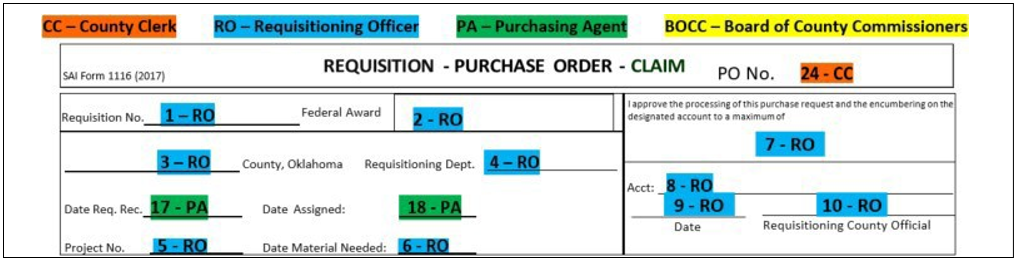
Figure 9. Requisition - Purchase Order - Claim Instructions #1-10
| Number Entry | Agent Role | Item Name | Tooltip |
|---|---|---|---|
| #1 | Requisitioning Officer | Requisition No. | Enters the sequential number for the requisition (optional) |
| #2 | Requisitioning Officer | Federal Award | Enters the sequential number for the requisition (optional) |
| #3 | Requisitioning Officer | County | Enters the name of the county |
| #4 | Requisitioning Officer | Requisitioning Dept. | Enters the designation of the department |
| #5 | Requisitioning Officer | Requisitioning Dept. | Enters the project number when requisitions are prepared to request items that are to be used in accomplishing a specified number of projects |
| #6 | Requisitioning Officer | Date Material Needed | Enters the project number when requisitions are prepared to request items that are to be used in accomplishing a specified number of projects |
| #7-10 | Requisitioning Officer | - | Enters the maximum amount to be encumbered, the fund account from which payment is to be made, dates, and signs |
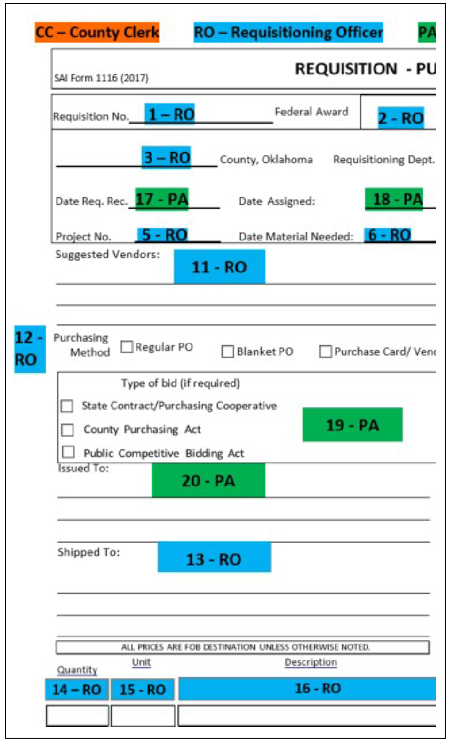
Figure 10. Requisition - Purchase Order - Claim Instructions #11-20
| Number Entry | Agent Role | Item Name | Tooltip |
|---|---|---|---|
| #11 | Requisitioning Officer | Suggested Vendors | Enters the names of suggested vendors that should be contacted if any are known. The purchasing agent is not restricted to contacting only the vendors entered |
| #12 | Requisitioning Officer | Purchasing Method | Enters the names of suggested vendors that should be contacted if any are known. The purchasing agent is not restricted to contacting only the vendors entered |
| #13 | Requisitioning Officer | Shipped To | Enters the address and/or location the item(s) are to be shipped |
| #14 | Requisitioning Officer | Quantity | Enters the quantity of the item(s) being requested |
| #15 | Requisitioning Officer | Unit | Enters the unit of issue for the item(s) being requested, such as gallons, tons, cubic yards, or each |
| #16 | Requisitioning Officer | Description | Enters the description of the item(s) being requested, describing it sufficiently for the purchasing agent and vendors to recognize the item(s). If there is insufficient room on the form, attach another sheet to the form. In cases where the item is described by written specifications, attach a copy of the specifications to the form. |
| #17 | Requisitioning Officer | Date Req. Rec. | Enters the date the requisition was received in the purchasing agent’s office Must begin the action necessary to obtain prices, either by shopping, vendor quotes, or bidding as the situation requires within two days after receipt Forwards prices when they are received, along with state contract prices when applicable, to the requisitioning officer |
| #18 | Requisitioning Officer | Date Assigned | Enters the date assigned to be encumbered |
| #19 | Requisitioning Officer | Type of Bid (if required) | Checks the box for State Contract/Purchasing Cooperative or County Purchasing Act or Public Competitive Bidding Act |
| #20 | Requisitioning Officer | Issued To | Enters the vendor's name and address Note: When using the purchasing card method, the purchasing agent will enter Bank of America under "Issued To." The actual vendor will be entered on the purchase card method line. |
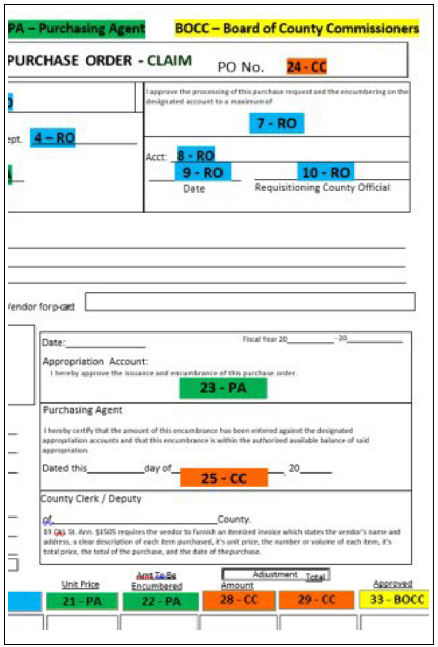
Figure 11. Requisition - Purchase Order - Claim Instructions #21-25
| Number Entry | Agent Role | Item Name | Tooltip |
|---|---|---|---|
| #21 | Purchasing Agent | Unit Price | Enters the unit price quoted from the vendor |
| #22 | Purchasing Agent | Amt To Be Encumbered | Enters the amount to be encumbered for each item listed and totals (If the total exceeds the amount in #7, the requisitioning officer must agree to adjust the amount in #7 for the continuation of the purchase) |
| #23 | Purchasing Agent | Approval | Completes the form by entering the fiscal year, date, appropriation account from which funds are to be encumbered and signing it. Forwards form to county clerk |
| #24 | County Clerk | PO No. | Enters the purchase order number |
| #25 | County Clerk | Certification | Completes the form by entering the date and signing it |
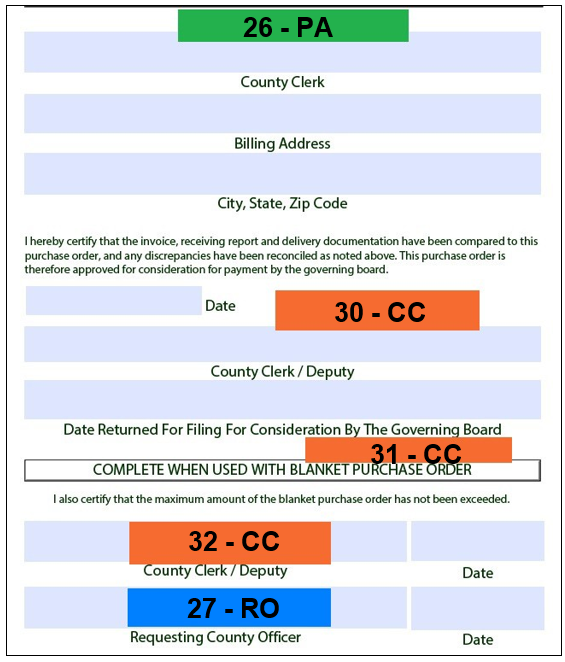
Figure 12. Requisition - Purchase Order - Claim Instructions #26, 27, 30-31
| Number Entry | Agent Role | Item Name | Tooltip |
|---|---|---|---|
| #26 | Purchasing Agent | Charge and Invoice To | Completes by entering the account to be charged and invoiced. Notifies selected vendor and places the order Files a copy of the form Sends copy to the receiving officer in the department receiving the item(s) |
| #27 | Requisitioning Officer | Complete when used with Blanket Purchase Order | Must provide written justification for the over expenditure and attach it to the form if the amount of the purchase order is exceeded |
| #28 | County Clerk (or Purchasing Agent) | Adjustment Amount | Enters any adjustment necessary to unit prices |
| #29 | County Clerk (or Purchasing Agent) | Adjustment Total | Files one copy of each document and forwards one copy of each to the county clerk. Enters any adjustment necessary in the total cost of all items on each line |
| #30 | County Clerk | Consideration for Payment | Completes the consideration for payment by entering the date and signing |
| #31 | County Clerk | Date Returned for Filing for Consideration by Governing Board | Enters the date the document package for payment is returned for consideration for payment by the board of county commissioners |
| #32 | County Clerk | Complete when used with Blanket Purchase Order | Dates and signs after verification that the maximum amount has not been exceeded. Verifies that written justification is attached if the maximum amount is exceeded. Holds the document package for three days or more after the considered payment date |
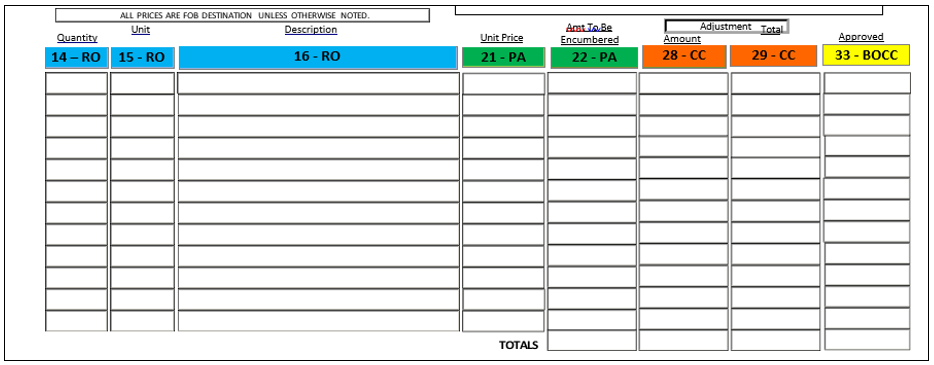
Figure 13. Requisition - Purchase Order - Claim Instructions #14-16, 21, 22, 28, 29 and 33
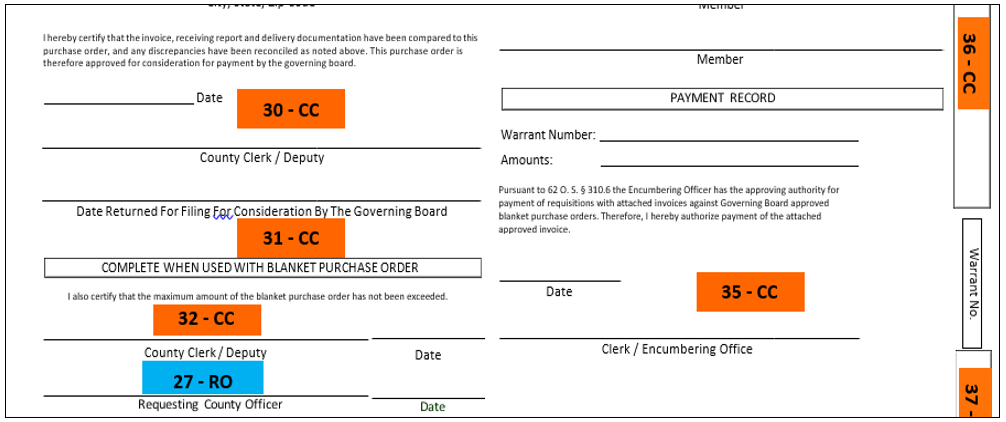
Figure 14. Requisition - Purchase Order - Claim Instructions #27, 30-32, 35-37
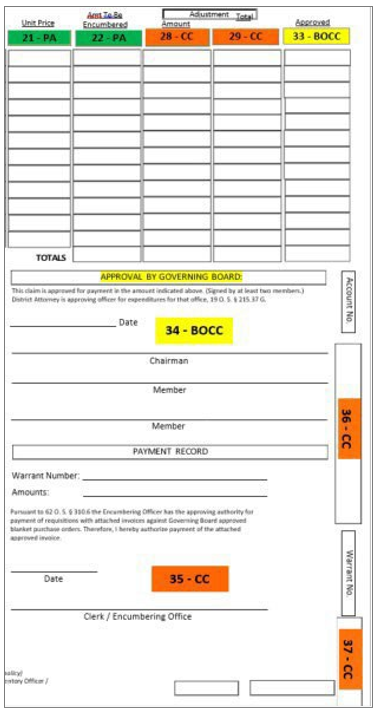
Figure 15. Requisition - Purchase Order - Claim Instructions #33-37
| Number Entry | Agent Role | Item Name | Tooltip |
|---|---|---|---|
| #33 | BOCC | Approved Amount | Enters the amount approved for payment for each line item and total |
| #34 | BOCC | Approval by Governing Board | Dates and signs |
| #35 | County Clerk | Payment Record | Enters the warrant number paying the claim, amount of the warrant, dates, and signs |
| #36 | County Clerk | Appropriation Account No. | Enters the account number of the funds upon which the warrant was drawn |
| #37 | County Clerk | Warrant No. | Enters the warrant number drawn to pay the claim Prepares the warrant for payment Files documents for this purchasing action |